How to File GST Returns Online: GSTR-1, GSTR-3B and GSTR-9 Step by Step (2026)
Short answer: Log in at gst.gov.in and open Services > Returns > Returns Dashboard. File GSTR-1 (your sales) by the 11th of the next month, or the 13th after the quarter if you are in QRMP. Reconcile your purchases with GSTR-2B (out on the 14th) so you claim only eligible input tax credit (ITC). Then file GSTR-3B: check the auto-filled liability and ITC, offset tax using credit first, pay any shortfall by challan, and file with DSC or EVC by the 20th (monthly) or the 22nd or 24th after the quarter, depending on your state. GSTR-9 is due by 31 December after the financial year.
Last updated 30 October 2026. Due dates are from the CGST Rules and CBIC notifications cited at the end. Screenshots are from MyPract, taken on 30 October 2026, with every client name, GSTIN, invoice number and amount replaced by sample values. This is practical guidance for taxpayers and their consultants, not legal advice.
This guide follows the order the returns depend on each other: GSTR-1, GSTR-2B reconciliation, GSTR-3B, then GSTR-9.
What are the GST return due dates in 2026?
| Return | Who files it | Due date |
|---|---|---|
| GSTR-1 (monthly) | Turnover above ₹5 crore, or anyone who chose monthly | 11th of the next month[2] |
| GSTR-1 (quarterly, QRMP) | Turnover up to ₹5 crore, quarterly option | 13th of the month after the quarter[2] |
| IFF (optional) | QRMP filers, B2B invoices for months 1 and 2 of a quarter | 1st to 13th of the next month[3] |
| GSTR-2B | Generated by the portal for every recipient | 14th of the next month |
| GSTR-3B (monthly) | Monthly filers | 20th of the next month[1] |
| GSTR-3B (quarterly), group 1 | QRMP, principal place of business in Chhattisgarh, Madhya Pradesh, Gujarat, Maharashtra, Karnataka, Goa, Kerala, Tamil Nadu, Telangana, Andhra Pradesh, Daman and Diu, Dadra and Nagar Haveli, Puducherry, Andaman and Nicobar Islands or Lakshadweep | 22nd of the month after the quarter[1] |
| GSTR-3B (quarterly), group 2 | QRMP, all other states and UTs (for example Delhi, Uttar Pradesh, West Bengal) | 24th of the month after the quarter[1] |
| PMT-06 (QRMP tax for months 1 and 2) | QRMP filers | 25th of the next month[1] |
| GSTR-9 (annual) | Aggregate turnover above ₹2 crore | 31 December after the financial year[4] |
The government can extend any of these by notification, so check the portal near a deadline.
Try MyPract free for 3 months
No card required, and the trial never converts to a paid plan automatically.
Start your free trialWhat should you check before you start filing?
Most GST mistakes happen before the return is opened. Five checks catch most of them:
- Registration is active and returns are up to date. You cannot file GSTR-1 while the previous period's GSTR-3B is pending.
- Monthly or quarterly. Confirm the client's filing preference for the quarter, because it decides both the due dates and which return tiles appear.
- Sales register is final for the period, with credit and debit notes, and B2B customers' GSTINs checked.
- Purchase register is final, so it can be matched with GSTR-2B.
- Someone can receive the OTP. EVC filing sends a one-time password to the authorised signatory's registered mobile number and email. If the client holds those, set up auto-forwarding of GST portal emails to the CA well before the due date.
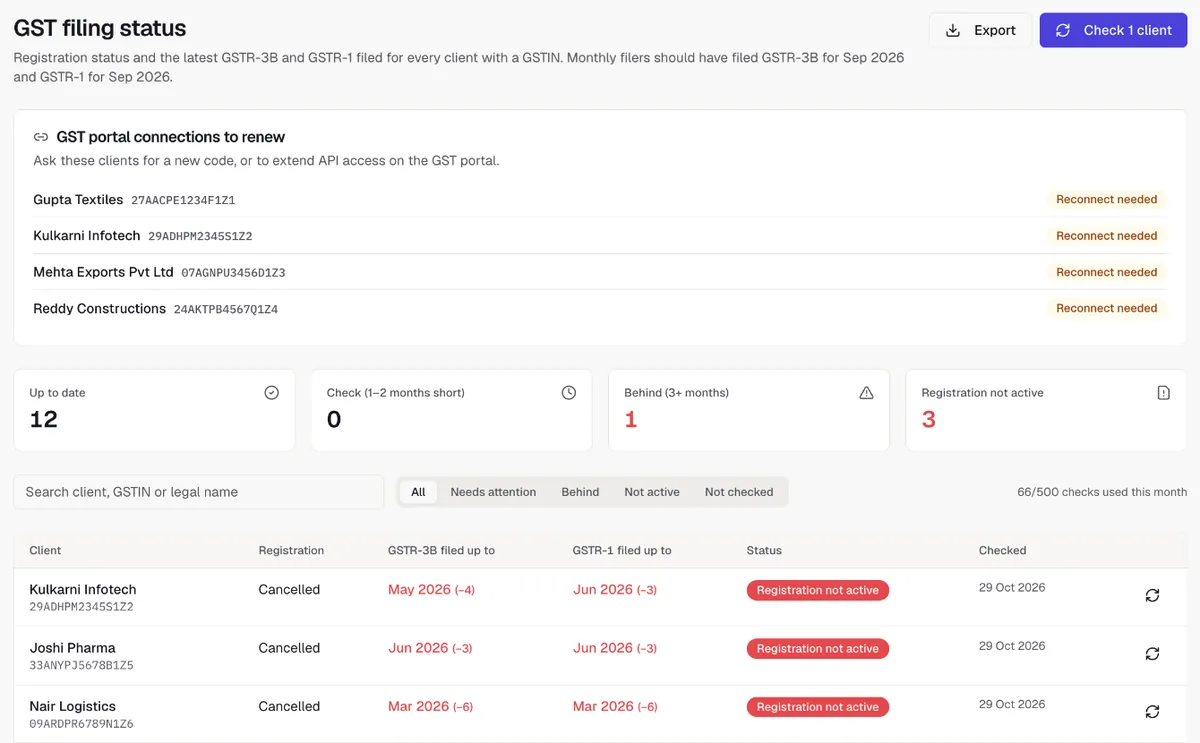
In MyPract the GST filing page shows, for every client with a GSTIN, the registration status and the latest GSTR-3B and GSTR-1 filed, and flags clients who are one or two months short or three or more behind.
How do you file GSTR-1 on the GST portal?
GSTR-1 reports your outward supplies. Your B2B customers see these invoices in their GSTR-2B, so a late GSTR-1 costs them credit too.
- Log in at gst.gov.in and go to Services > Returns > Returns Dashboard.
- Choose the financial year and the period (month, or quarter for QRMP filers) and click Search.
- On the GSTR-1 tile, choose Prepare Online, or Prepare Offline to upload a JSON file made with the GST offline tool or your accounting software.
- Fill the tables that apply: B2B invoices (4A), large B2C inter-state invoices (5), other B2C supplies (7), credit and debit notes (9B), exports (6A), nil-rated and exempt supplies (8), the HSN summary (12) and documents issued (13).
- Click Save in each table, then Generate GSTR-1 Summary and download the preview. Check totals against your sales register.
- Tick the declaration, choose the authorised signatory and click File Statement, then File with DSC or File with EVC (enter the OTP).
- Note the ARN.
QRMP filers can upload B2B invoices for the first two months of a quarter through the Invoice Furnishing Facility (IFF) so their customers get the credit monthly. Found a mistake after filing GSTR-1 but before GSTR-3B? Use GSTR-1A for the same period, because the tax liability in GSTR-3B is auto-filled from GSTR-1 and GSTR-1A and can no longer be edited in GSTR-3B[5].
How do you reconcile GSTR-2B with your purchase register?
GSTR-2B is the statement of input tax credit available to you, built from what your suppliers reported. It is generated on the 14th of the following month. Under section 16(2)(aa) of the CGST Act, you can claim credit only for invoices that appear there.
- Open GSTR-2B from the Returns Dashboard (or through the Invoice Management System, where you can accept, reject or keep invoices pending before the statement is final) and download it.
- Match each document with the purchase register on supplier GSTIN, invoice number, date, taxable value and tax.
- Sort the result into four groups: matched; mismatched (same invoice, different amount or date); in books but not in GSTR-2B (do not claim yet; ask the supplier to report it); in GSTR-2B but not in books (book it, or reject it if it is not yours).
- Exclude blocked credit under section 17(5) and anything marked ITC not available.
- Carry the eligible total into Table 4 of GSTR-3B.
MyPract's ITC reconciliation card does this on the client's GST portal tab: it fetches GSTR-2B, takes the month's purchase register, and matches by supplier GSTIN, invoice number, date and amounts, with tolerances you set.
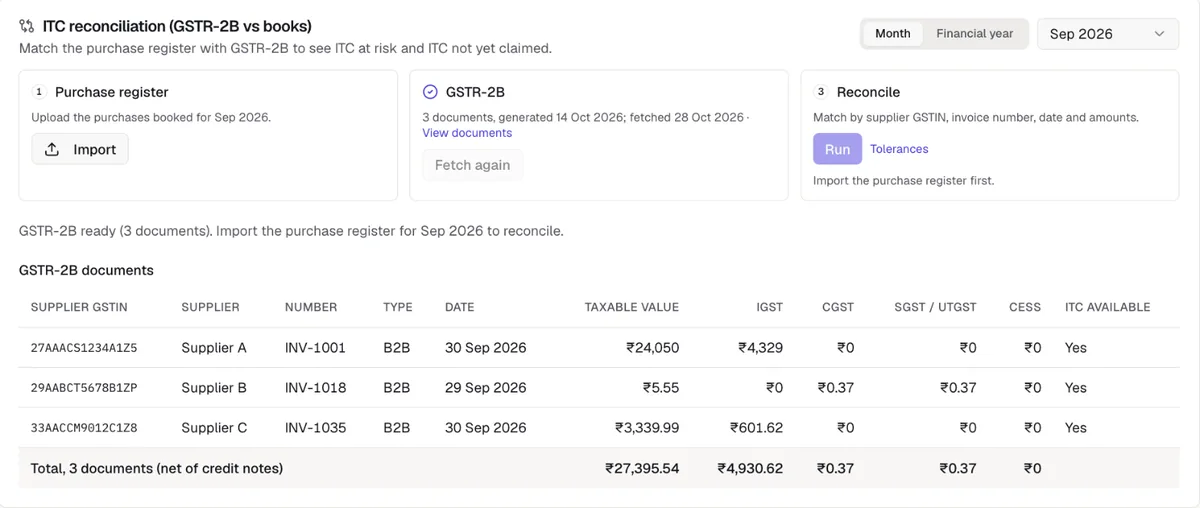
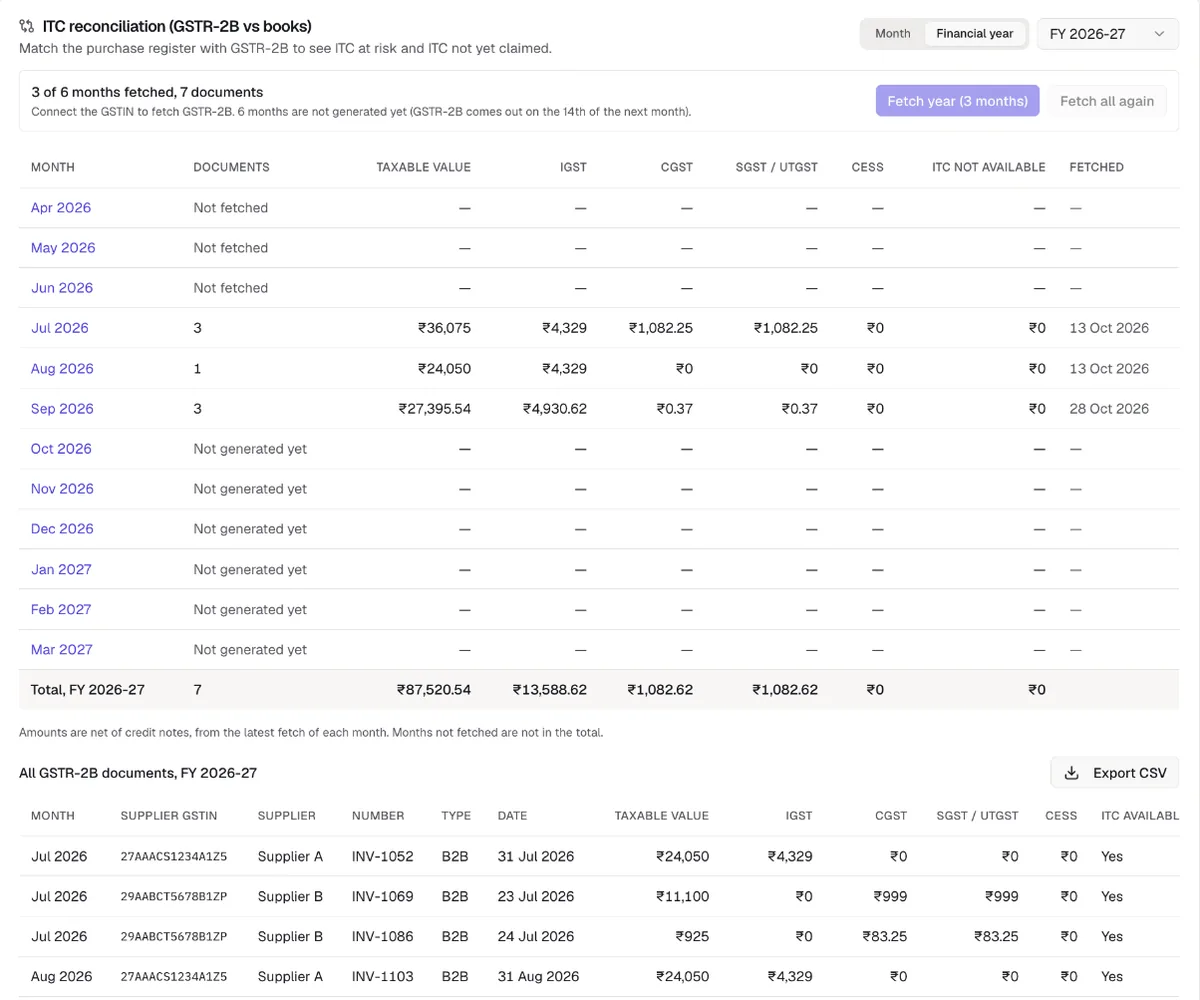
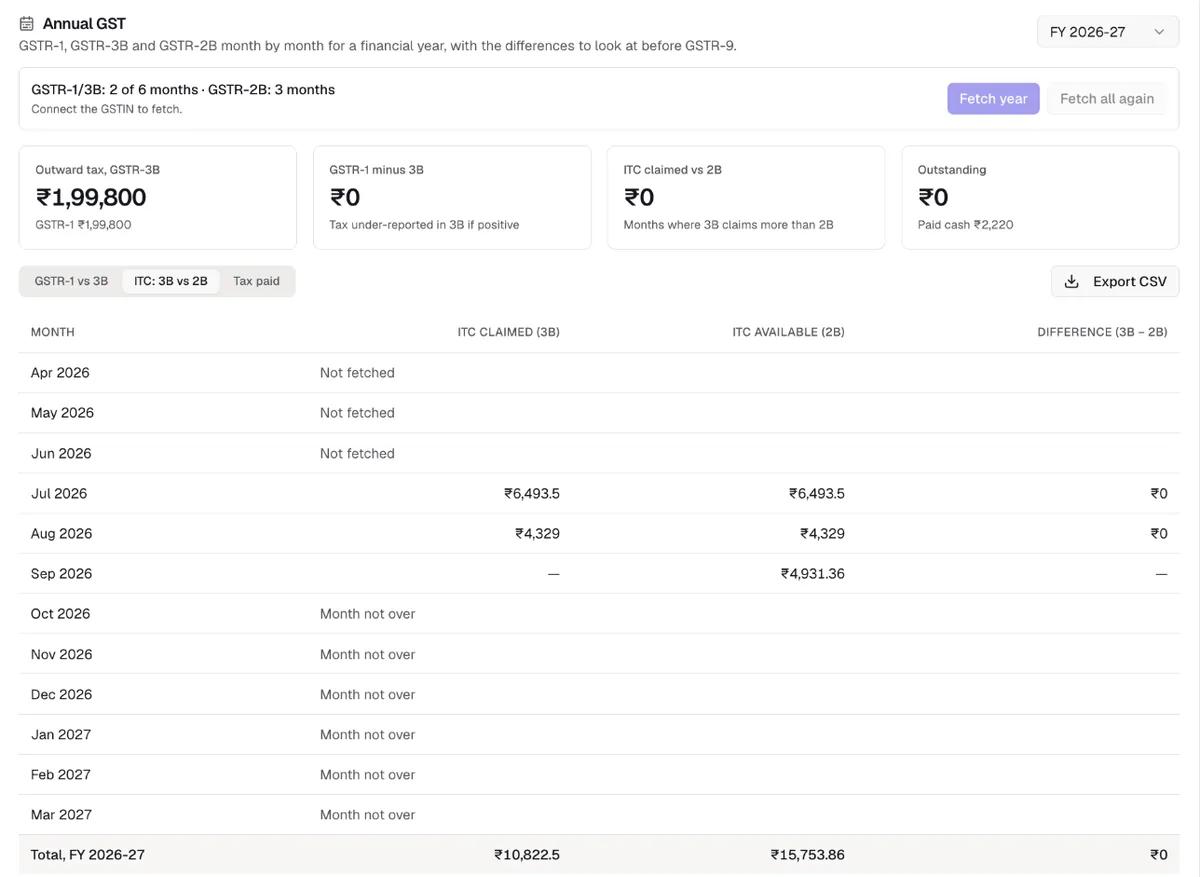
The financial year view adds up every month's GSTR-2B, which is the figure to compare with ITC claimed in GSTR-3B before the annual return.
How do you file GSTR-3B step by step?
GSTR-3B is where tax is declared and paid. File GSTR-1 first and finish the GSTR-2B reconciliation, because GSTR-3B is pre-filled from both.
- On the Returns Dashboard, select the period and choose Prepare Online on the GSTR-3B tile. Answer the questions about which tables apply.
- Table 3.1 (outward supplies) is auto-filled from GSTR-1, GSTR-1A and IFF. Check it against the GSTR-1 summary. Reverse charge purchases (3.1(d)) are entered by you.
- Table 4 (ITC) is auto-filled from GSTR-2B. Reduce it to the eligible amount from your reconciliation and report reversals.
- Fill exempt and nil-rated inward supplies (Table 5) and interest or late fee if any, then click Save GSTR-3B.
- Click Proceed to Payment. The portal shows tax payable and the cash and credit ledger balances. Credit is used before cash, and IGST credit is used first, in the order section 49 and rule 88A set.
- If credit falls short, click Create Challan, pay the shortfall by net banking, UPI, card or over the counter, and come back to the payment screen.
- Click Make Payment / Post Credit to Ledger to offset the liability.
- Tick the declaration and click File GSTR-3B with DSC or with EVC. Save the ARN.
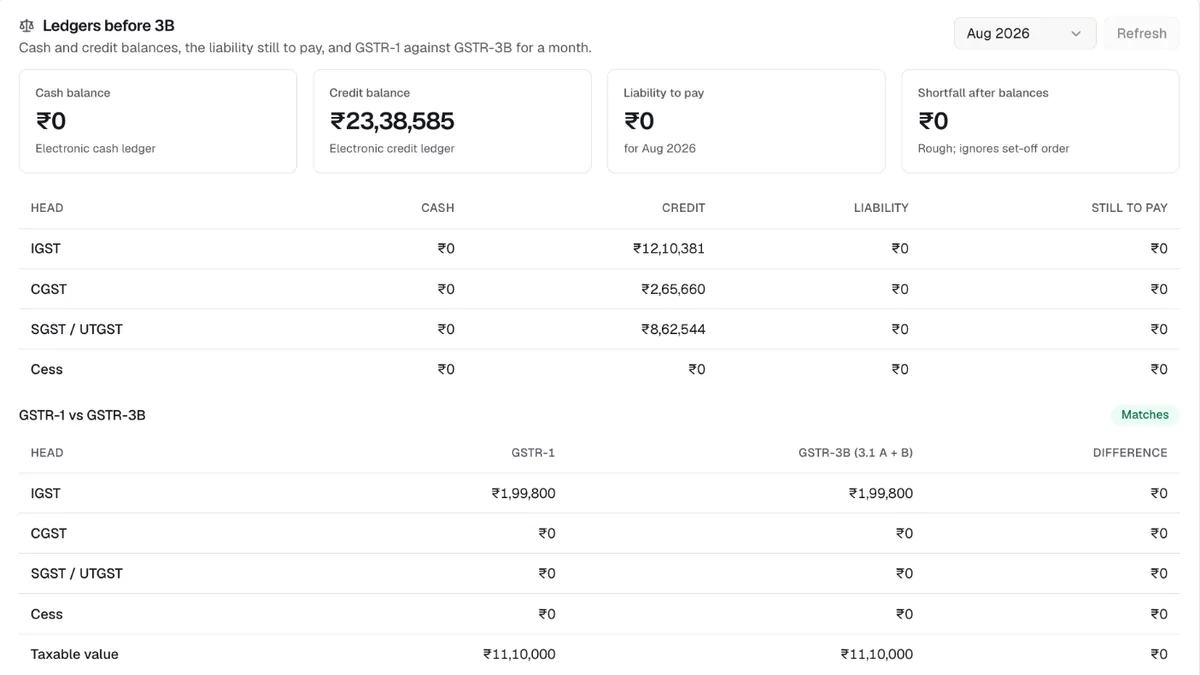
Compare ledger balances and the GSTR-1 liability before step 5. MyPract's Ledgers before 3B card shows the cash and credit balances, the liability still to pay, and GSTR-1 against GSTR-3B head by head for the month.
How do you file the annual return GSTR-9?
GSTR-9 restates the year's supplies, ITC and tax paid.
- On the Returns Dashboard, choose Annual Return, the financial year, and Prepare Online on the GSTR-9 tile.
- Download the system-computed GSTR-9, the GSTR-1/IFF summary, the GSTR-3B summary and the Table 8A document details (ITC as per GSTR-2B).
- Answer the questionnaire, then fill tables 4 to 19, starting from the system values and correcting them from your books.
- Explain any gap between Table 8A credit and ITC claimed in GSTR-3B.
- Click Compute Liabilities. Pay any extra tax through DRC-03.
- Preview the draft, then File GSTR-9 with DSC or EVC.
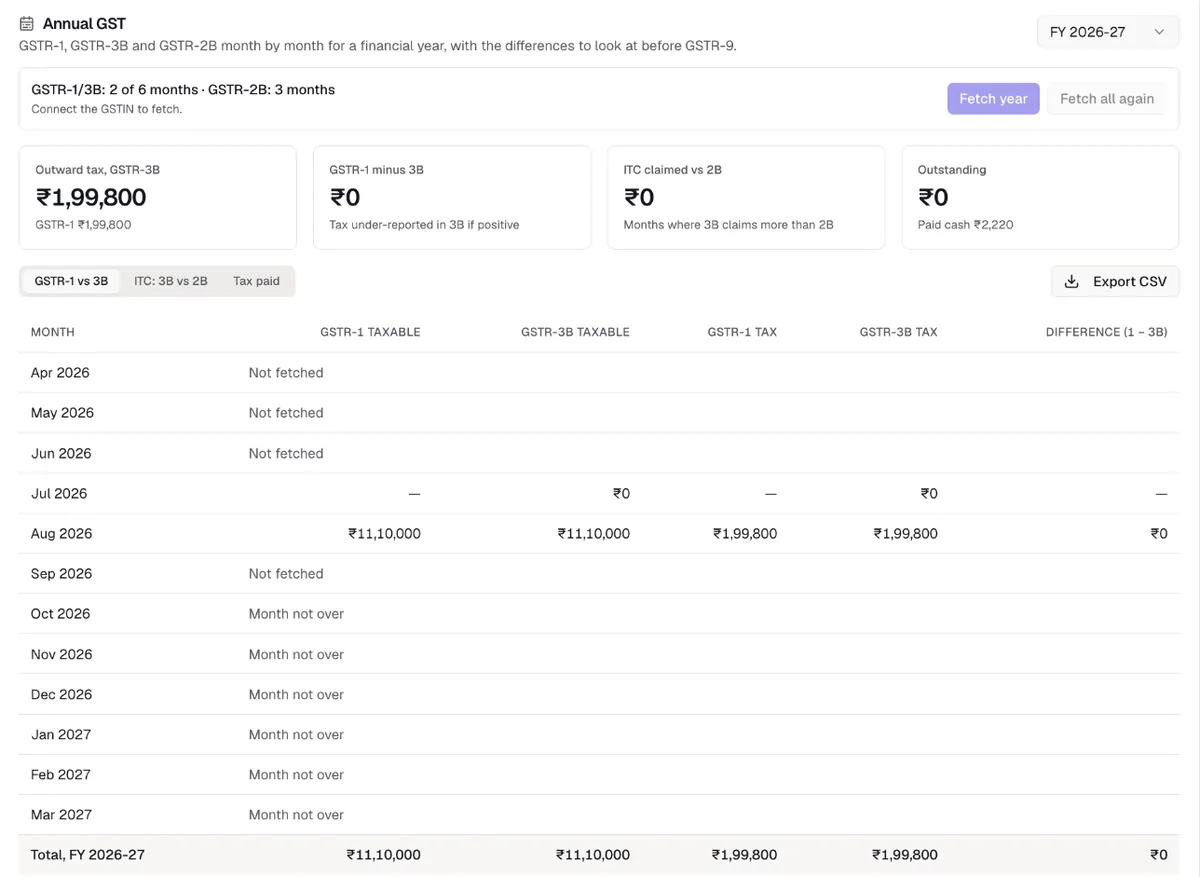
Most GSTR-9 work is finding months where GSTR-1 and GSTR-3B disagree, or 3B claimed more ITC than 2B. MyPract's Annual GST card puts both side by side, month by month, for the financial year.
How does a CA firm run GST filing for many clients?
With many clients, the hard part is tracking who is pending and whose OTP you are waiting for. A workable routine:
- One engagement per client for GST, with a recurring task per return and period, and a named preparer and reviewer.
- A status check at the start of each cycle for registration, last returns filed and the monthly or quarterly preference.
- Reconciliation before preparation: GSTR-2B against the purchase register, and ledgers against the GSTR-1 liability.
- ARNs and challans saved to the client's documents the day the return is filed.
MyPract connects to a client's GSTIN once the client enables API access on the GST portal and shares a one-time code. The connection runs for the session the portal allows; when it ends, MyPract asks for a new code.
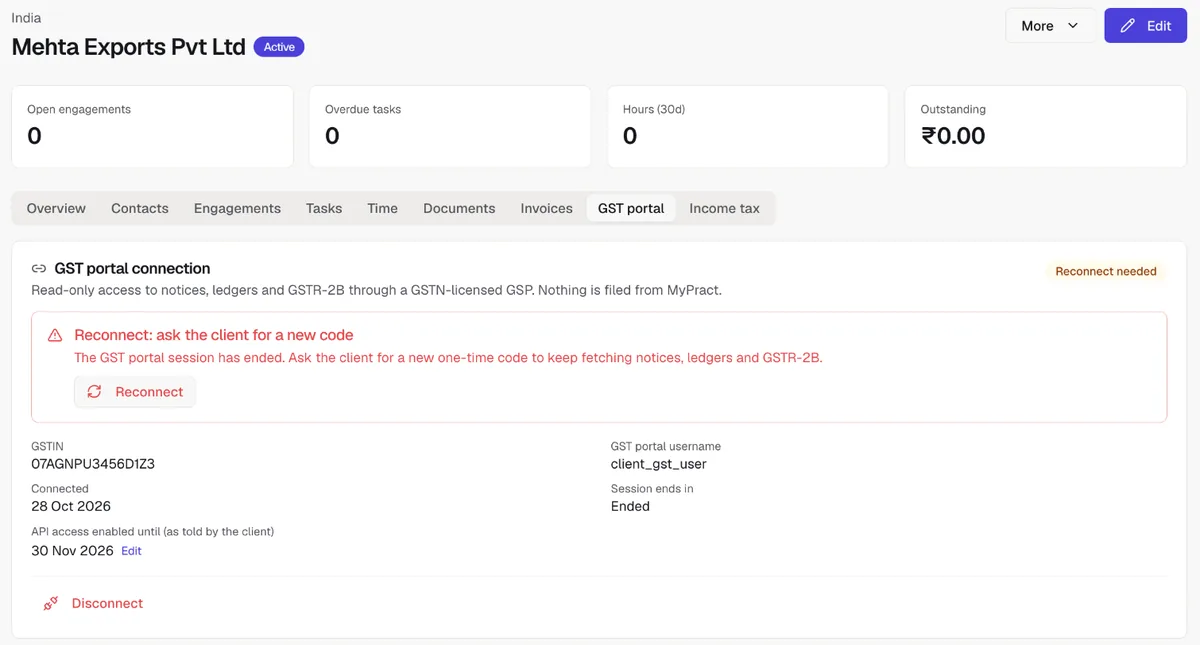
MyPract does not file GST returns: it reads portal data so the firm can check a client's position, and the filing is done on the GST portal. See the pricing, what it does and doesn't do on our facts page, and how it compares in best practice management software for tax consultants and best practice management software for CA firms. For changes in the law, see our summary of the 57th GST Council meeting recommendations.
Try MyPract free for 3 months
No card required, and the trial never converts to a paid plan automatically.
Start your free trialHow we checked
Due dates were checked on 30 October 2026 against rule 61 of the CGST Rules (GSTR-3B and PMT-06), Notification 83/2020-Central Tax (GSTR-1), rule 59 (IFF) and section 44 with Notification 15/2025-Central Tax (GSTR-9). Portal steps follow the GST portal's Returns Dashboard; button names change from time to time. The MyPract screenshots were taken from a live workspace without fetching from or filing on the portal, after replacing every client and supplier name, GSTIN, username, invoice number and the workspace and user names with sample values, and multiplying every amount by a constant, so no real taxpayer can be identified.
Frequently asked questions
What is the due date for GSTR-3B?
Monthly filers file GSTR-3B by the 20th of the next month. Quarterly (QRMP) filers file by the 22nd of the month after the quarter if their principal place of business is in Chhattisgarh, Madhya Pradesh, Gujarat, Maharashtra, Karnataka, Goa, Kerala, Tamil Nadu, Telangana, Andhra Pradesh or the listed southern and western Union territories, and by the 24th everywhere else. The government can extend a date by notification, so check the GST portal near the deadline.
What is the difference between GSTR-1 and GSTR-3B?
GSTR-1 is the statement of outward supplies, invoice by invoice for B2B sales, which your customers see in their GSTR-2B. GSTR-3B is the summary return in which you declare tax payable, claim input tax credit and pay the tax. The tax liability in GSTR-3B is auto-filled from GSTR-1, so file GSTR-1 first and correct it through GSTR-1A, not in GSTR-3B.
Can I claim input tax credit that is not in GSTR-2B?
No. Under section 16(2)(aa) of the CGST Act, credit is available only for invoices your supplier has reported and that appear in your GSTR-2B. Hold back the credit for an invoice missing from GSTR-2B, ask the supplier to report it, and claim it in the month it appears.
What happens if I file GSTR-1 or GSTR-3B late?
A late fee applies for each day of delay (₹50 a day, or ₹20 a day for a nil return, split between CGST and SGST, subject to caps), and interest at 18% a year on tax paid late in cash under section 50. You cannot file GSTR-1 for a period if GSTR-3B for the previous period is pending, so one late return blocks the next.
Do small businesses have to file GSTR-9?
Not if aggregate turnover is up to ₹2 crore. Notification 15/2025-Central Tax exempts them from FY 2024-25 onwards. Above ₹2 crore, GSTR-9 is due by 31 December after the financial year, and above ₹5 crore the reconciliation statement GSTR-9C is filed as well.
Does MyPract file GST returns?
No. MyPract reads GST portal data through a GSTN-licensed GST Suvidha Provider (filing status, notices, ledgers, GSTR-1 vs GSTR-3B and GSTR-2B reconciliation) so a firm can check a client's position before filing; the return is filed on the GST portal. See our facts page.
Sources
[1] CBIC, "CGST Rules, 2017: Rule 61, Form and manner of furnishing of return", https://taxinformation.cbic.gov.in/content/html/tax_repository/gst/rules/cgst_rules/active/chapter8/rule61_v1.00.html (checked 30 October 2026).
[2] Directorate of Commercial Taxes, West Bengal, "Compilation of notifications of extension of the due dates for filing of FORM GSTR-1" (Notification 83/2020-Central Tax), https://comtax.wb.gov.in/GST/GST_PPU/Dt_Ext_Notifications_of_GSTR%20_1%20_20220228.pdf (checked 30 October 2026).
[3] CBIC, "CGST Rules, 2017: Rule 59, Form and manner of furnishing details of outward supplies", https://taxinformation.cbic.gov.in/ (checked 30 October 2026).
[4] Lexplosion, report on Notification 15/2025-Central Tax (GSTR-9 exemption up to ₹2 crore from FY 2024-25), https://lexplosion.in/cbic-exempts-taxpayers-with-aggregate-turnover-upto-rs-2-crores-from-filing-gst-annual-return-for-financial-year-2024-25-onwards/ (checked 30 October 2026).
[5] Taxscan, "GSTN advisory: auto-populated liability in GSTR-3B to become non-editable from July 2025", https://www.taxscan.in/top-stories/gstn-advisory-auto-populated-liability-in-gstr-3b-to-become-non-editable-from-july-2025-1421228 (checked 30 October 2026).
Related reading
- How to Auto-Forward GST Portal Emails and OTPs to Your CA (and Keep a Copy)Set up Gmail, Outlook or Zoho Mail to forward emails from donotreply@gst.gov.in to your CA automatically, keep a copy in your inbox, and stay safe.
- Best Practice Management Software for Tax Consultants in India (2026)Which office software fits Indian tax consultants and GST practitioners: notices, return volume, GST data, filing tools and year-one cost, compared.
- Best Practice Management Software for CA Firms in India (2026)Which practice management software suits which CA firm in 2026: MyPract, Jamku, ERPCA, Zoho Practice, CCH iFirm, TaxDome, Karbon and XPM compared.
- 57th GST Council Meeting: Every Key Recommendation Explained for CA Firms57th GST Council meeting highlights: no GST arrests, ₹5 crore prosecution limit, no notices below ₹10,000, automated refunds, wider ITC, and what CAs should do.
Start with the best practice management software for CA firms, or see every comparison, MyPract pricing, all features or MyPract at a glance.