GSTR-2A vs GSTR-2B: How to Reconcile Them Month by Month and for the Year
Short answer: GSTR-2A is a live view of what your suppliers have uploaded and keeps changing; GSTR-2B is a fixed statement generated on the 14th of the next month, and it is what your input tax credit (ITC) must match. Reconcile them every month to catch suppliers who haven't filed and invoices filed late, then once more across the financial year before GSTR-9.
Last updated 30 October 2026. Legal points are from the CGST Act, the CGST Rules and the GST portal's own help pages, cited at the end. Screenshots are from MyPract, taken on 30 October 2026 for a live client, with every GSTIN, invoice number and amount replaced by sample values. This is practical guidance for taxpayers and their consultants, not legal advice.
What is the difference between GSTR-2A and GSTR-2B?
Both are statements of inward supplies that the GST portal builds from your suppliers' returns. Neither is filed by you. The difference is timing, and timing decides which one your credit depends on.
| GSTR-2A | GSTR-2B | |
|---|---|---|
| What it is | System-generated statement of inward supplies | Auto-drafted ITC statement |
| When it changes | Updated incrementally whenever a supplier uploads or changes a document for the period[1] | Generated once, on the 14th of the next month (quarter-end month for QRMP recipients), then read-only and static[2] |
| What it covers | Documents filed by suppliers for that tax period, whenever they filed | Documents filed between the cut-off dates, for any period[2] |
| Role in ITC | Tracking and follow-up | Basis for ITC in GSTR-3B under section 16(2)(aa) and rule 36(4)[3][4] |
Since 1 January 2022, section 16(2)(aa) of the CGST Act allows credit only if the supplier has furnished the invoice in its statement of outward supplies and the details have been communicated to you[3]. Rule 36(4) spells out that communication: the invoice must reach you in GSTR-2B[4]. So GSTR-2B decides what you can claim this month, and GSTR-2A tells you what is still coming.
Try MyPract free for 3 months
No card required, and the trial never converts to a paid plan automatically.
Start your free trialWhy don't GSTR-2A and GSTR-2B match?
A mismatch is normal. These are the usual reasons, in the order you will meet them:
- The supplier filed after the cut-off. For a monthly supplier, GSTR-2B picks up documents filed up to 11:59 pm on the 11th of the next month; for quarterly filers and IFF, up to the 13th[2]. An invoice filed on the 15th is in this month's GSTR-2A but lands in next month's GSTR-2B.
- The supplier hasn't filed GSTR-1 at all. A saved but unfiled GSTR-1 can show in GSTR-2A, which also tells you whether the supplier has filed. Until they file, there is no credit.
- A late invoice for an earlier month. The reverse case: a document dated in July filed in September appears in September's GSTR-2B but in July's GSTR-2A.
- Amendments. A supplier amends an invoice after the cut-off, so the tax differs between 2A and 2B.
- Your own action in the Invoice Management System. Since October 2024 you can accept, reject or keep pending a supplier's record before GSTR-2B is generated; anything left with no action is deemed accepted when GSTR-2B is generated[5]. A rejected or pending record will not be in that GSTR-2B.
How do you reconcile GSTR-2A with GSTR-2B for a month?
Do this after GSTR-2B is generated on the 14th and before you file GSTR-3B.
- Download GSTR-2A and GSTR-2B for the month from Services > Returns > Returns Dashboard on the GST portal.
- Match documents by supplier GSTIN, document type and document number. Strip spaces, slashes and hyphens from the number before matching, because suppliers type them differently.
- List the documents in 2A but not in 2B, and split them: supplier hasn't filed, filed after the cut-off (expect them in a later 2B), or simply missing.
- List the documents in 2B but not in 2A. These are almost always late filings for earlier months; check you haven't already claimed them.
- For matched documents, compare the tax. A difference is usually an amendment.
- Chase the suppliers who haven't filed before your own GSTR-3B due date, and hold back their credit.
Your purchase register is still reconciled against GSTR-2B, not GSTR-2A, because GSTR-2B is what the credit depends on. The GST filing guide walks through that step and the rest of GSTR-3B.
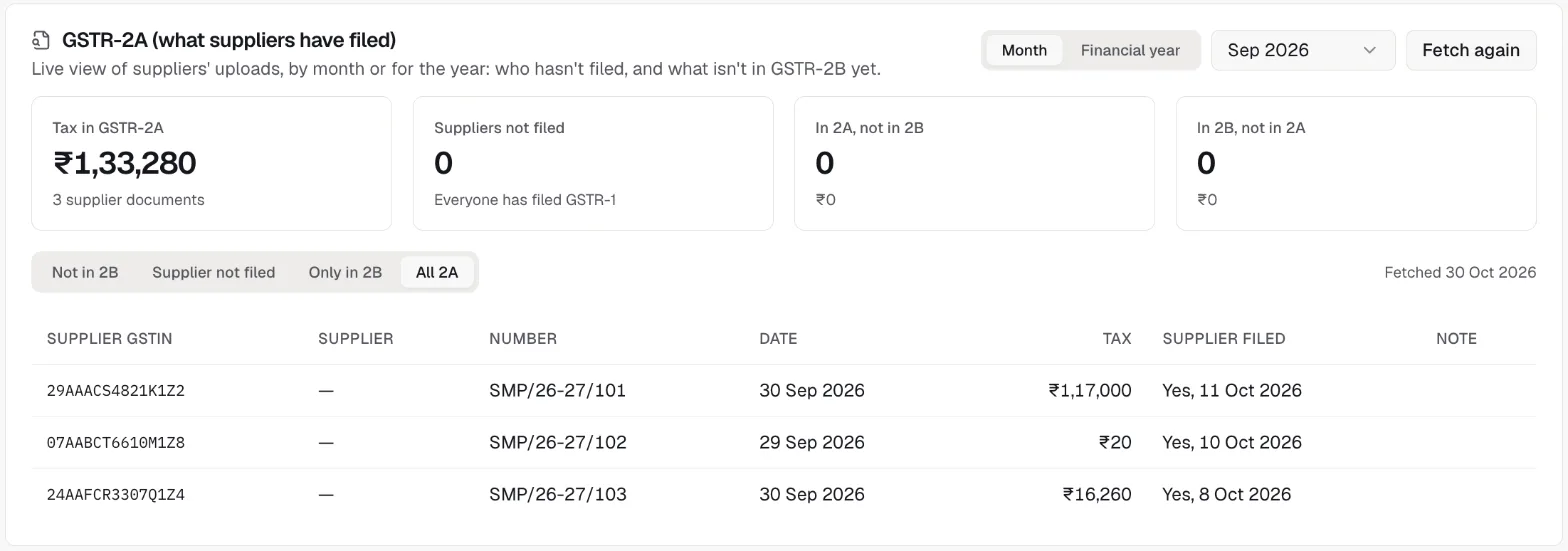
In MyPract, the GSTR-2A card on a client's GST portal tab does steps 2 to 5 for you. Fetch GSTR-2A reads every section for the month from the GST portal (about 9 portal calls: B2B, B2B amendments, credit and debit notes and their amendments, ISD, TDS, TCS and imports). The card then shows the tax in GSTR-2A, how many suppliers haven't filed GSTR-1 and the tax at risk, documents in 2A but not in 2B, and documents in 2B but not in 2A. The tabs Not in 2B, Supplier not filed, Only in 2B and All 2A list the documents, with whether and when the supplier filed and a note on why a document is not in this month's GSTR-2B.
How do you reconcile GSTR-2A and GSTR-2B for the whole year?
A month-by-month view always shows some noise, because late filings move documents into later months. Across a financial year that noise cancels out. The rule for the year is simple: a GSTR-2A document is fine if it appears in the GSTR-2B of any month of the same financial year.
- Get GSTR-2A for every month of the year that is over, and fetch it again close to year-end, since suppliers keep filing late.
- Get GSTR-2B for every month of the year.
- Mark each GSTR-2A document as found in some GSTR-2B of the year, or not.
- What remains falls into two groups: suppliers who never filed, and documents filed after the year's last cut-off, which will appear in next year's GSTR-2B.
- Total by supplier, so you know who to chase and how much credit depends on each one.
This is the work to finish before the annual return. Table 8A of GSTR-9 is built from these statements, and a supplier who never filed is a credit you should not have claimed.
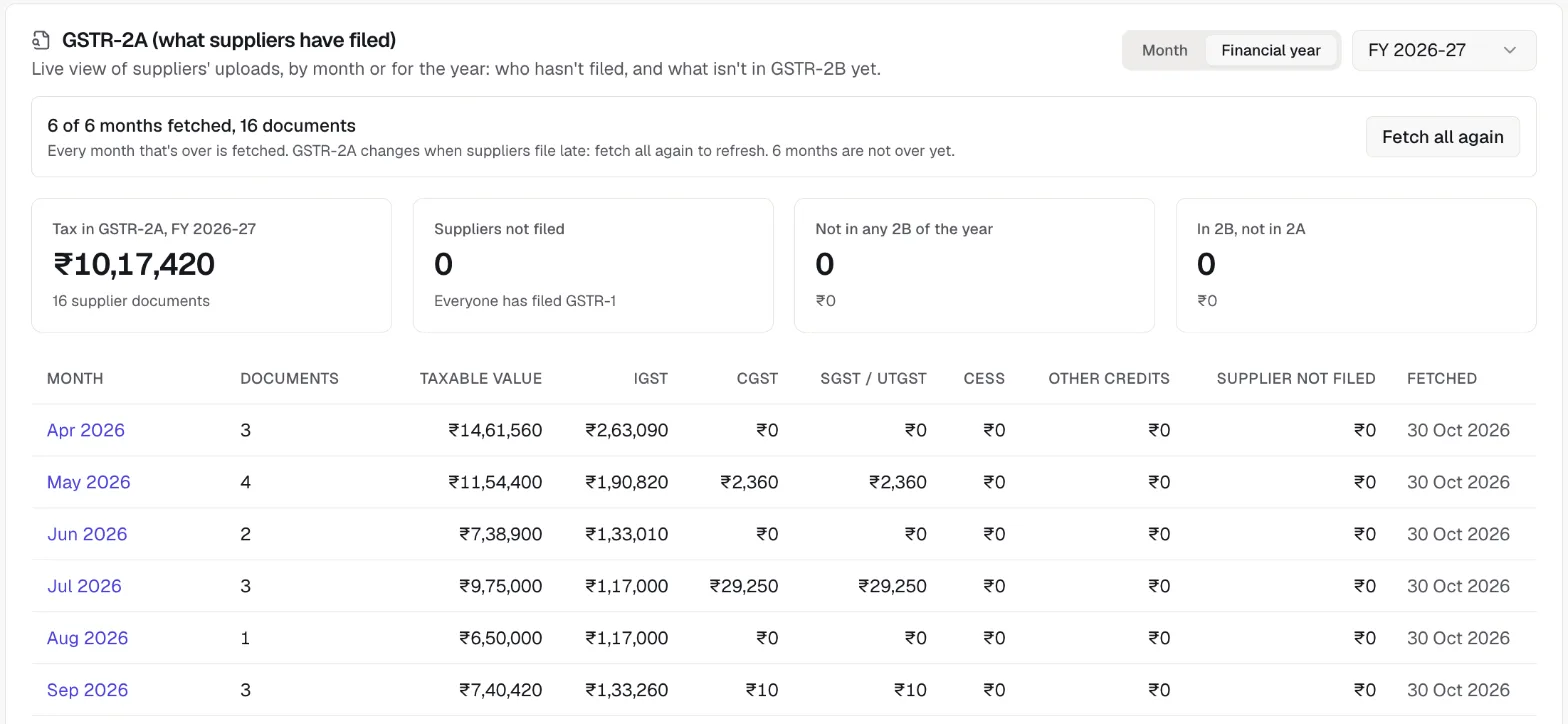
In MyPract, switch the GSTR-2A card to Financial year. Fetch year gets GSTR-2A for every month of the year that is over and not fetched yet, one month at a time with progress (about 9 portal calls a month), and stops if the portal session expires, the portal is under maintenance or it hits a rate limit. Because GSTR-2A keeps changing, Fetch all again refreshes the whole year. The month-wise table shows documents, taxable value, IGST, CGST, SGST, cess, other credits and tax from suppliers who haven't filed, with year totals.
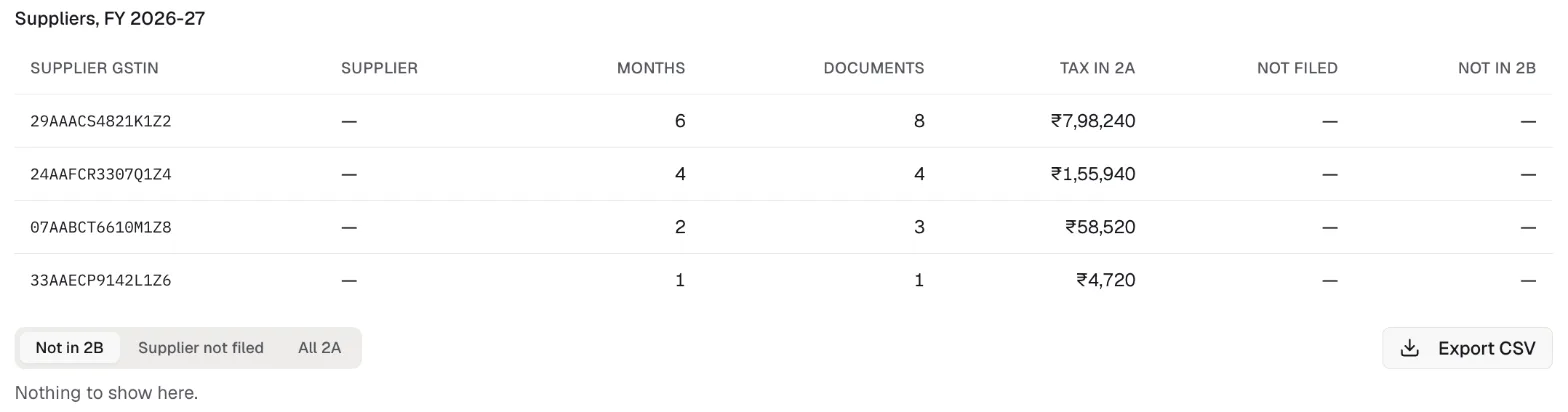
Below the months, a supplier table lists each supplier GSTIN with the months it appears in, its documents, tax in GSTR-2A, tax not filed and tax not in any GSTR-2B of the year. The year's documents can be filtered the same way (Not in 2B, Supplier not filed, All 2A) and downloaded with Export CSV to send to the client or the supplier.
What should you do about suppliers who haven't filed?
Credit for their invoices isn't available until the invoice reaches your GSTR-2B, so act early:
- Send the supplier the list of documents with numbers, dates and tax, and ask them to file GSTR-1 (or IFF) before the cut-off.
- Hold back the credit in GSTR-3B until the invoice appears in GSTR-2B, then claim it in that month.
- Keep the payment in view. Many firms delay paying the GST portion until the supplier files.
- Check registration. A supplier whose registration has been cancelled cannot fix it by filing late; MyPract shows the cancellation date in the note when the portal reports it.
- Track the follow-up as work. Make it a task in the client's engagement, so someone owns it before the due date.
How does MyPract fit into GST work for a CA firm?
MyPract is a practice management platform for accounting, audit, tax and advisory teams. For Indian clients with a GSTIN, it reads GST portal data through a GSTN-licensed GST Suvidha Provider, after the client's GSTIN is connected with a one-time code: filing status, notices turned into tasks, ledgers, GSTR-1, GSTR-2A and GSTR-2B (see /facts for the full list). The GSTR-2A comparison sits next to the GSTR-2B reconciliation with the purchase register, so a reviewer can see both on one tab.
What it does not do:
- It does not file anything. Returns are filed on the GST portal, and GSTR-2A and GSTR-2B are read-only.
- GSTR-2B stays the ITC source. The purchase register is reconciled with GSTR-2B, not with GSTR-2A.
- It is a working tool, not an accounting system. Credit decisions and entries stay in your books.
If you are choosing software for the whole firm, the roundup of practice management software for CA firms and the guide for tax consultants compare the options; pricing is on /pricing.
Try MyPract free for 3 months
No card required, and the trial never converts to a paid plan automatically.
Start your free trialHow we checked
We read section 16 of the CGST Act and rule 36 of the CGST Rules on CBIC's tax information portal, and the GSTR-2A, GSTR-2B and Invoice Management System help pages on the GST portal, on 30 October 2026. The MyPract views were run on a live client on 30 October 2026 (a September 2026 month and FY 2026-27) and every identifying value was replaced before the screenshots were taken.
Frequently asked questions
What is the main difference between GSTR-2A and GSTR-2B?
GSTR-2A is updated whenever a supplier uploads or changes a document for the period, so it can change months later. GSTR-2B is generated once, on the 14th of the following month, from documents filed up to the cut-off, and it does not change. Credit in GSTR-3B is taken on the basis of GSTR-2B.
Can I claim input tax credit on an invoice that is in GSTR-2A but not in GSTR-2B?
Not in that month. Section 16(2)(aa) of the CGST Act and rule 36(4) of the CGST Rules allow credit only when the invoice has been reported by the supplier and communicated to you in GSTR-2B. If the supplier filed after the cut-off, the invoice appears in the next GSTR-2B and you claim it then.
Why is an invoice in GSTR-2B but not in GSTR-2A for the same month?
Usually because the supplier reported it late. GSTR-2A lists a document under the supplier's own tax period, while GSTR-2B picks up whatever was filed between its cut-off dates, so an invoice dated in an earlier month can appear in this month's GSTR-2B. Amendments can also move a document.
Do I need to reconcile GSTR-2A for the whole year?
It helps before GSTR-9 and before replying to notices. Over a year, a document is fine if it appears in any GSTR-2B of the same financial year. What is left are suppliers who never filed and documents filed after the year's last cut-off, which carry into the next year's GSTR-2B.
Does MyPract file GST returns or change GSTR-2B?
No. MyPract reads GSTR-2A and GSTR-2B from the GST portal through a GSTN-licensed GST Suvidha Provider and shows the differences. GSTR-2B itself is read-only on the portal, and every return is filed on the GST portal.
Sources
[1] GST Portal, "FAQs > Form GSTR-2A", https://tutorial.gst.gov.in/userguide/returns/GSTR_2A.htm (checked 30 October 2026).
[2] GST Portal, "FAQs > Viewing Form GSTR-2B", https://tutorial.gst.gov.in/userguide/returns/FAQ_gstr2b.htm (checked 30 October 2026).
[3] CBIC, "CGST Act, 2017: Section 16, Eligibility and conditions for taking input tax credit" (clause (aa) inserted from 1 January 2022 by the Finance Act, 2021), https://taxinformation.cbic.gov.in/content/html/tax_repository/gst/acts/2017_CGST_act/active/chapter5/section16_v1.00.html (checked 30 October 2026).
[4] CBIC, "CGST Rules, 2017: Rule 36, Documentary requirements and conditions for claiming input tax credit", https://taxinformation.cbic.gov.in/content/html/tax_repository/gst/rules/cgst_rules/active/chapter5/rule36_v1.00.html (checked 30 October 2026).
[5] GSTN, "FAQs on Invoice Management System (IMS)", https://tutorial.gst.gov.in/downloads/news/final_faqs_on_ims_22_09_2024.pdf (checked 30 October 2026).
Related reading
- How to File GST Returns Online: GSTR-1, GSTR-3B and GSTR-9 Step by Step (2026)File GSTR-1 and GSTR-3B on the GST portal step by step: 2026 due dates, GSTR-2B ITC reconciliation, payment and offset, GSTR-9 and pre-filing checks.
- GSTR-9 Reconciliation Checklist: What to Match Before You File the Annual ReturnBefore filing GSTR-9, reconcile GSTR-1 with GSTR-3B, ITC in 3B with GSTR-2B and Table 8A, tax paid, and next-year amendments. Checklist with due dates.
- How to Auto-Forward GST Portal Emails and OTPs to Your CA (and Keep a Copy)Set up Gmail, Outlook or Zoho Mail to forward emails from donotreply@gst.gov.in to your CA automatically, keep a copy in your inbox, and stay safe.
- Best Practice Management Software for Tax Consultants in India (2026)Which office software fits Indian tax consultants and GST practitioners: notices, return volume, GST data, filing tools and year-one cost, compared.
- Best Practice Management Software for CA Firms in India (2026)Which practice management software suits which CA firm in 2026: MyPract, Jamku, ERPCA, Zoho Practice, CCH iFirm, TaxDome, Karbon and XPM compared.
Start with the best practice management software for CA firms, or see every comparison, MyPract pricing, all features or MyPract at a glance.